Overview
The Request form is used to request emergency or long-term security coverage. Once submitted, the request is routed through an internal approval process before being sent to the vendor for acknowledgement and acceptance or rejection.
Submitting Security Services Request
To create a new request, complete and submit the Security Services Request form.
1. Assignment Setup
Provide the following details.
- Assignment type
- Location (create a new location as needed)
- Service type
- Service provider
- Security provider rate
- Billing code
2. Service Details
Enter the service-specific information.
- Assignment position
- Reason
- Patrol vehicle required (yes no)
- Restroom available for guard (yes no)
3. Schedule
Define the service schedule.
- Start date
- Ongoing or Termination Date & Time
- Schedule start time
- Schedule end time
- Toggle switches for workdays
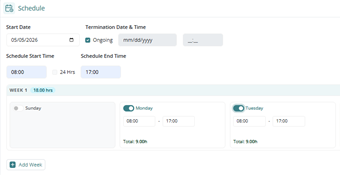
- Edit any days with different start/end times
- Add week for rotating weeks
4. Officer Requirements
Enter any specific instructions or requirements.
Submitting the Request
After submission:
- The request goes through internal approval process.
- Once approved, the request is sent to the vendor.
- The vendor will then:
- Acknowledge the request
- Accept or reject the request
- If accepted, they will sign the operations summary
- Assignment is created.
Was this article helpful?
That’s Great!
Thank you for your feedback
Sorry! We couldn't be helpful
Thank you for your feedback
Feedback sent
We appreciate your effort and will try to fix the article