Request Status
The Request Status page allows users to review, track, and manage assignment requests throughout the approval and vendor acknowledgment process. Users can search for specific requests, filter results, review pending approvals, and monitor assignments nearing completion.
Request list overview
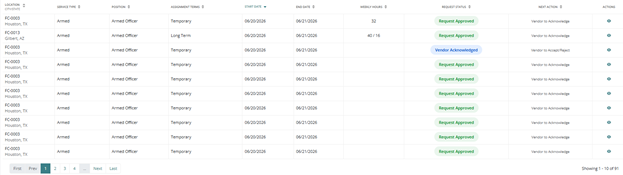
The main section of the page displays a table of requests. You can filter for specific requests or view all requests.
The table includes the following columns:
- Location
- Service Type (Armed, Unarmed)
- Position
- Assignment Terms (Long term, Temp)
- Start Date
- End Date
- Weekly Hours
- Request Status (Approved, Submitted, Vendor Acknowledged)
- Next Action (Vendor to Acknowledge, Approve or Deny)
- Actions (Click to view more information)
Filters for requests
Refine results using the following filters:
- Location(s)
- Security Provider(s)
- Position(s)
- District(s)
- Division(s)
- Region(s)
- Status
- Acknowledged
- State
- City

Pending Review
Click ‘Review’ under ‘Pending Review’ to quickly look over any requests waiting on approvals. 
You can make minor updates to the following fields:
- Service Type
- Rate
- Billing code
- Interval Check-in
- Attendance Verification
- Schedule start date
- Ongoing or termination date and time
- Schedule start/end time
- Scheduled days and alternating weeks
After reviewing or making changes, approve or deny the request.
Waiting for Vendor Acknowledgment
Select ‘Review’ under ‘Waiting for Vendor Acknowledgment’ to view requests that have been sent to the vendor and are awaiting acknowledgment.

At this stage, the vendor must acknowledge receipt of the request before proceeding.
Waiting for Vendor Acceptance
Select ‘Review’ under ‘Waiting for Vendor Acceptance’ to view requests that have been sent and acknowledged by the vendor and are now waiting to be accepted or rejected.

Assignments Ending in 2 Weeks
This section provides visibility into assignments approaching completion.

Review upcoming expirations to extend assignments if needed or create replacement requests.
Was this article helpful?
That’s Great!
Thank you for your feedback
Sorry! We couldn't be helpful
Thank you for your feedback
Feedback sent
We appreciate your effort and will try to fix the article